Posts

Installing Glut

Image
Download the glut from this link:-

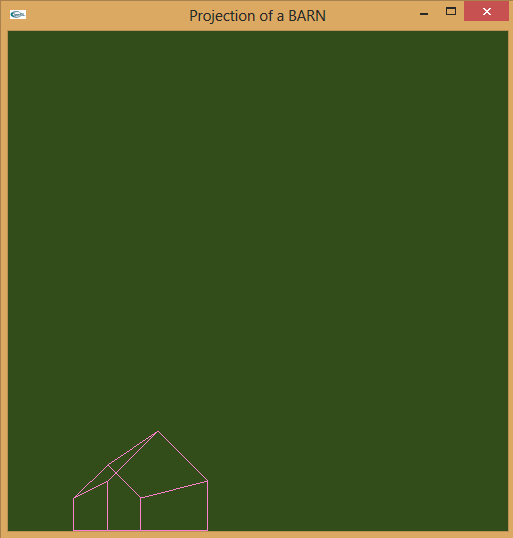
OpenGl - Displays a BARN shape on the XY plane.

Image
Source Code: 1: #include <windows.h> 2: #include <gl/Gl.h> 3: #include <gl/glut.h> 4: #include <cmath> 5: 6: int WinWidth = 500, WinHeight = 500; 7: 8: typedef struct{float x;float y;}Point2D; 9: typedef struct{float x;float y;float z;}Point3D; 10: 11: 12: Point3D COP = {100,100,-200}; 13: 14: Point3D A,B,C,D,E,F,G,H,I,J; // Vertices of the BARN 15: 16: void InitBarn(){ 17: A.x = 200; A.y = 100; A.z = 200; 18: B.x = 200; B.y = 00; B.z = 200; 19: C.x = 400; C.y = 00; C.z = 200; 20: D.x = 400; D.y = 100; D.z = 200; 21: E.x = 300; E.y = 200; E.z = 200; 22: 23: F.x = 200; F.y = 100; F.z = 400; 24: G.x = 200; G.y = 00; G.z = 400; 25: H.x = 400; H.y = 00; H.z = 400; 26: I.x = 400; I.y = 100; I.z = 400; 27: J.x = 300; J.y = 200; J.z = 400; 28: } 29: 30: void constructBarn(Point2D A, Point2D B, Point2D C, Point2D D...

Alpha Blending Matlab Code

Image
Ibg=imread('E:\IP\codes\flower.jpg'); Ifg=imread('E:\IP\codes\beetle.jpg'); if length(size(Ibg))==3         Ibg=rgb2gray(Ibg); end if length(size(Ifg))==3         Ifg=rgb2gray(Ifg); end alpha = 0.2; [row,col] = size(Ibg); I = zeros(row,col); I = uint8(I); for i = 1:row     for j = 1:col         I(i,j) = alpha * Ibg(i,j) + (1 - alpha) * Ifg(i,j);     end end subplot(1,3,1); imshow(Ibg); subplot(1,3,2); imshow(Ifg); subplot(1,3,3); imshow(I);

Auto Contrast Matlab Code

Image
I=imread('E:\IP\imgs\lena.jpg'); amin = 0; amax = 255; if length(size(I))==3         I=rgb2gray(I); end alow = min(min(I)); ahigh = max(max(I)); [r,c] = size(I); J = zeros(r,c); for m=1:r     for n=1:c         a = I(m,n);         a1 = amin +((a - alow) * ((amax - amin) / (ahigh - alow)));         J(m,n) = a1;     end end J = uint8(J); subplot(1,2,1); imshow(I); subplot(1,2,2); imshow(J);

Filters

Difference between Point Operation and Filters         Filters generally used   more than one pixel from the source image for computing each new pixel values. The capability of Point operation is limited. For example, In Point operation can't blur or sharpen an image.        

Definitions

Digital Image Processing: Manipulate a digitalized image using a computer. Digital Image Editing: Manipulation of digital images using an existing software application such as Adobe Photoshop or Corel Paint Pixel: The smallest addressable unit of an image. Histogram: Frequency distribution of image intensities.

AI Techniques

Image
AI technique is a method of exploit knowledge. programs which are using AI technique are have disadvantages and advantages          Disadvantage AI technique programs are slower to execute            Advantages They are much less fragile People can easily understand what the program knowledge is They can work for large problems where more direct methods break down AI Techniques Search Use of Knowledge Abstraction